Sage X3 has a special feature of allowing the user to gaze through the Price/Cost/Amount in different currency for every transaction. The price which is converted to different currency is displayed temporarily on the screen. This can be used in order to just check out the actual rate in different currency without any calculation. The Converted Currency Rate should be present Currency Rate table.
Our Other Blogs: Sage CRM | Sage 300 ERP | SalesForce.com
How to get the Price in different currency?
You can go to any screen to get the price in different currency.
In the below example We are navigating to Sales >Invoices >Invoices .
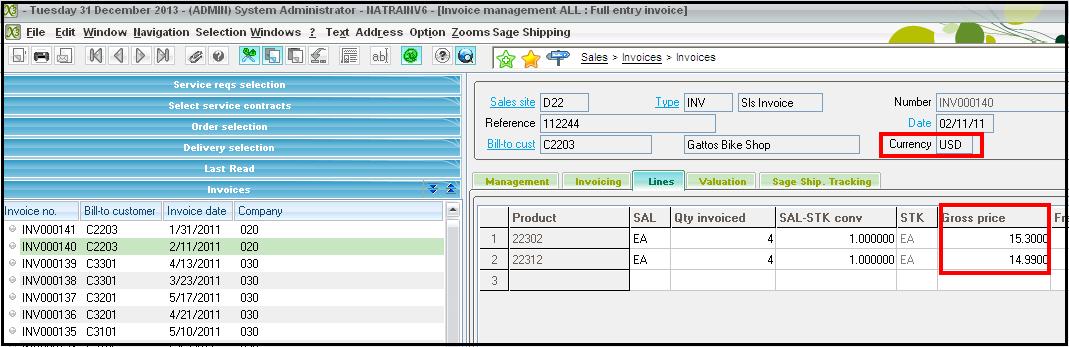
Here the Gross price is in USD Currency
Select the box where the Price is mentioned and Press Ctrl+F9. A new pop Up window will appear in which you have to mention the Currency you want to convert.
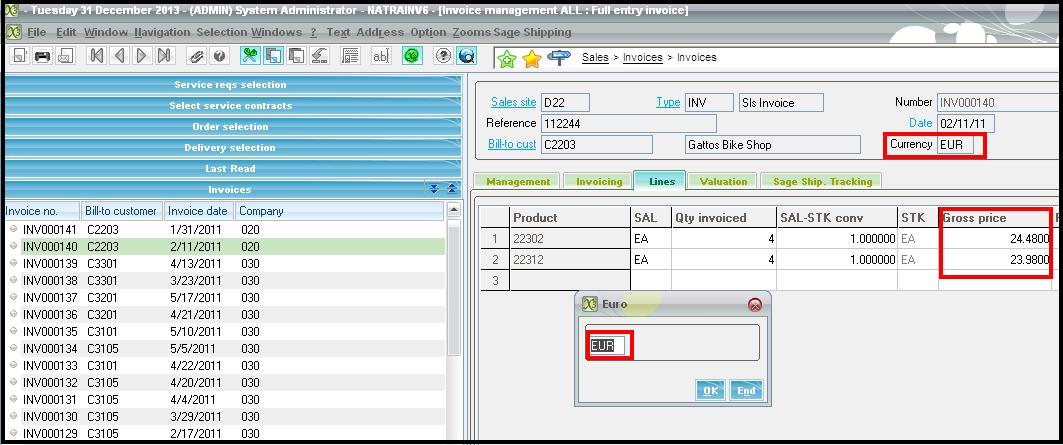
The converted price will be displayed on the Screen where the original price is displayed.The converted price doesn’t get stored anywhere. It changes to its previous currency value when clicked on End button. Generally this Converted Rate is for display purpose only.
Also Read:
1) How to Override Forex Rates while Importing Transactions
2) Use of Multiple Ledger Currency in Transactions in Sage ERP X3
3) Control Max Decimals of Currency in Sage X3
4) Supplier pre-payment settlement in Sage X3
5) How to setup tax rates for different companies